

I’ve long been interested in aircraft and flying in general. More recently, that interest has been primarily been in passenger air travel.
Where we live, we often see flights departing or arriving to YVR as the routes come very close to our building. When I see a flight passing by I am quick to look up the details on sites like Flight Radar.
I’d seen things like the Flight Wall advertised on Instagram that displayed nearby flight information, but I felt that the price point was higher than I would be willing to pay for a bit of a novelty piece of hardware. I then saw an ad for the Ulanzi TC001 which offered the use of custom firmware that would allow for custom display that could be driven via an API locally.
Thus, I set out to try and utilise the TC001 in a similar manner to a Flight Wall device.
Project Snapshot
Goal: Display local flights
Hardware: Ulzanzi TC001
Built With: AWTRIX NG, Python, live flight data
What I wanted to build
The initial goal was to create a flight display without spending a significant amount of money. I wanted it to mimic behaviour of the Flight Wall, but not be a complete copy.
The approach
Prior to purchasing the TC001, I did some research on if other people had previously done anything similar and came across a post by someone who had done essentially what I was looking to do. After this, I was sold on the idea and ordered a TC001 directly from Ulanzi.

Example of the TC001 Flight Display
Building it
I am not a software developer. I am generally comfortable with networking and the like, but writing code more advanced than basic HTML is not something I am capable of. Part of my hope with this project would be to learn a bit, but I ultimately decided that I would vibe code this via ChatGPT.
I fully admit this is probably not exactly the best way to learn, but I also like instant gratification, so here we are.
Initial Build
The first working version could detect nearby aircraft, work out what they were and where they were going, and cycle their flight details across the TC001 alongside airline graphics, weather and time. It also included some early spotting-oriented features such as watchlists, alerts, closest-approach information and a history of recently seen aircraft.
Current Architecture
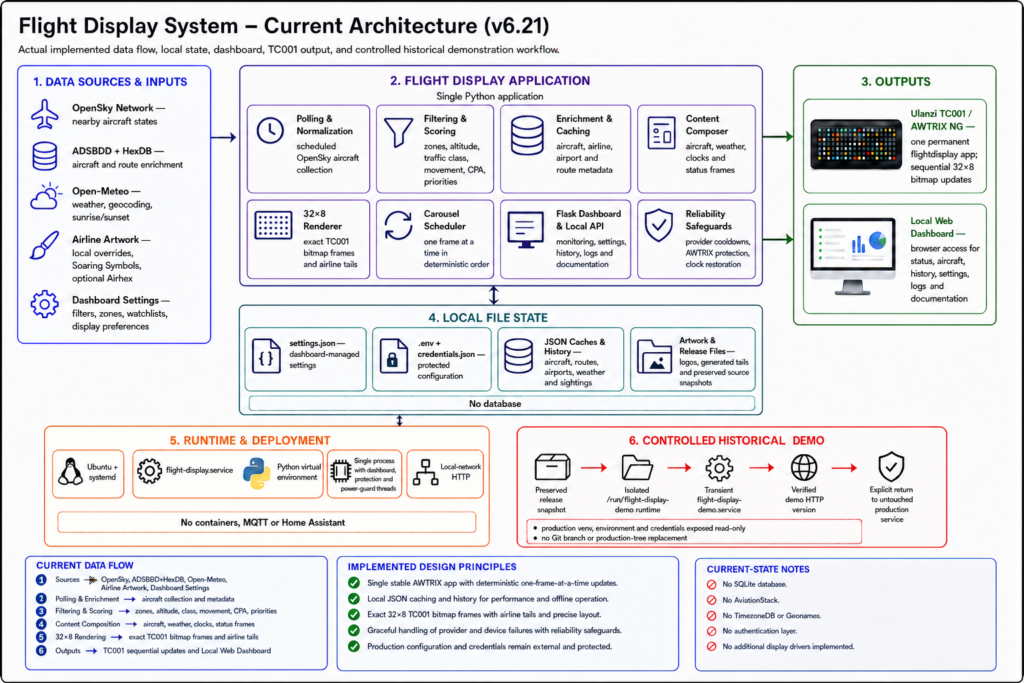
The software that drives this is running on an Ubuntu server that I already had configured for other needs. The overview of the existing architecture is as follows:
What’s next
For now, this project is in a place that I am generally happy with. I will make more posts detailing the iterations that have been built as well as where I hope to take it in the future, so stay tuned.